2. Running 'headless' (as others have done) would keep the power consumption to a minimum and would require mimimum cabling.
3. No cooling fans or heatinks needed so will be silent in operation and will keep its size very small.
4. Using the GPIO it may be possible to 'do something' when the web pages are accessed. Being a petrol head I decided it would be extremely good fun to fit the Pi into a model car which could be on display, if possible the GPIO would be used to flash the car lights when the web pages were accessed. Having recently been on holiday to Florida and loving the shape I decided to install the Pi in a Camaro model, a quick search on google threw up Maisto model cars with a couple of Camaro options, 1:18 or 1:24 scale. A web enquiry to Maisto about the actual physical size of these scale models was never answered so I gambled on 1:18 scale, not wanting to pay full price for something that may not be the right size good old ebay came to the rescue and a new in box Camaro was purchased for £11.
 After a couple of evenings tinkering the Pi was configured to run 'headless' with PHP/Lighttpd/mysql installed and my web pages moved across to it, slightly harder work but still fun I got my weather station up and working with the Pi.
Another couple of evenings of google research and playing with the GPIO outputs I has an LED flashing when a web page was accessed, this was quiet a major achievment as I had some doubts it could be done.
While all the Pi configuring was going on some 3mm LEDs and some 1.5mm fibre optic strands were ordered and the camaro was dismantled.
After a couple of evenings tinkering the Pi was configured to run 'headless' with PHP/Lighttpd/mysql installed and my web pages moved across to it, slightly harder work but still fun I got my weather station up and working with the Pi.
Another couple of evenings of google research and playing with the GPIO outputs I has an LED flashing when a web page was accessed, this was quiet a major achievment as I had some doubts it could be done.
While all the Pi configuring was going on some 3mm LEDs and some 1.5mm fibre optic strands were ordered and the camaro was dismantled.
 After many different thoughts on how to do the lighting and what was going to flash I came to the conclusion that the idea was to have a car not a christmas tree so I will just have the headlights flashing on/off when a page accessed,
as the Camaro will be on display I also decided to add some extra lighting that will be controlled by a phototransistor so that they only come on when it gets dark, fitted so far is a red LED in each wheel arch, front/rear side lights and front driving/fog lights,
one red LED is used to light the rear lights and one white LED is used to light the front lights via the fibre optic strands.
Here are pictures of a test, wheel arch and headlight powered up.
After many different thoughts on how to do the lighting and what was going to flash I came to the conclusion that the idea was to have a car not a christmas tree so I will just have the headlights flashing on/off when a page accessed,
as the Camaro will be on display I also decided to add some extra lighting that will be controlled by a phototransistor so that they only come on when it gets dark, fitted so far is a red LED in each wheel arch, front/rear side lights and front driving/fog lights,
one red LED is used to light the rear lights and one white LED is used to light the front lights via the fibre optic strands.
Here are pictures of a test, wheel arch and headlight powered up.
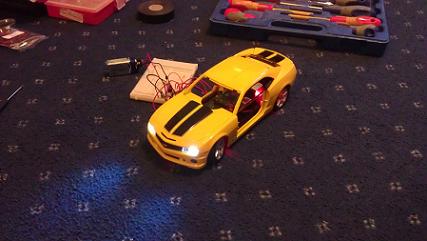
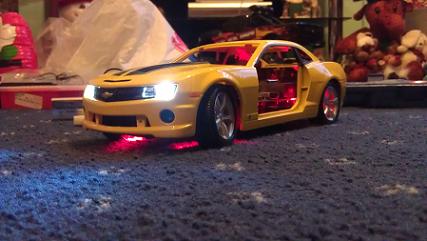
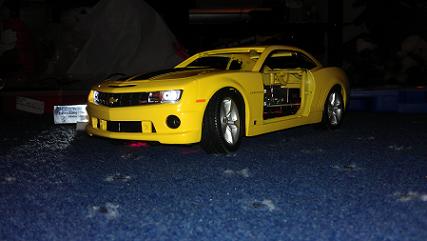 As of 06/01/13 All up and working, decide to use cron to turn the sidelights and red led in wheel arches on and off as it seemed pointless to have the lights on all night by using the phototransistor, they currently run from 17.00 to 22.00
I have logged the power consumption as a comparison to the old web server:
As of 06/01/13 All up and working, decide to use cron to turn the sidelights and red led in wheel arches on and off as it seemed pointless to have the lights on all night by using the phototransistor, they currently run from 17.00 to 22.00
I have logged the power consumption as a comparison to the old web server:
| PII 300 No Load | PII 300 Full Load | Raspberry Pi | |
|---|---|---|---|
| Volts | 237 |
237 |
231 |
| Amps | 0.21 |
0.32 |
0.02 |
| Watts | 30 |
46 |
3 |
| V/A | 51 |
77 |
3 |
I have had a comment on the youtube video asking about a description of the code used to flash the LED's so here are some simple steps on what I did: 1. Install wiringpi: https://projects.drogon.net/raspberry-pi/wiringpi/ 2. Create a c program that uses wiringpi, blink.c here is a good example: http://log.liminastudio.com/writing/tutorials/tutorial-how-to-use-your-raspberry-pi-like-an-arduino 3. Create a new folder in www called gpio 4. Move the compiled c program to the gpio folder 5. Give the web server account (www-data) permission to execute the blink program i.e. give it root access to only execute the blink program, from command line type: Sudo visudo Add this line at the bottom: www-data ALL=NOPASSWD: /var/www/gpio/blink 6. Within your PHP code on the web page add this to run the blink progam: $result=exec('sudo gpio/blink > /dev/null &');
Out of interest to see if this website gets visits I log the page hits, the info can be viewed here: Site Stats